
A restaurant phone ordering system needs to give callers the same service standard while using the right menu, prices, and pickup rules for each location. For a growing restaurant group, consistency depends on both shared operating rules and accurate local information. If you are still deciding how the phone fits alongside online ordering, start with where phone ordering fits next to online orders.
One location may have an experienced host who answers every call quickly. Another may have one employee covering the counter, phones, delivery drivers, and half the dining room. The brand may be the same, but callers can have very different experiences.
Set the service standard once
Restaurant groups already use brand standards, operating procedures, and training materials to give guests a recognizable experience. Phone service needs that same attention, especially during the dinner rush when staff are serving guests, processing orders, and coordinating deliveries. Promotions, local events, holidays, and staff absences can change demand or available coverage.
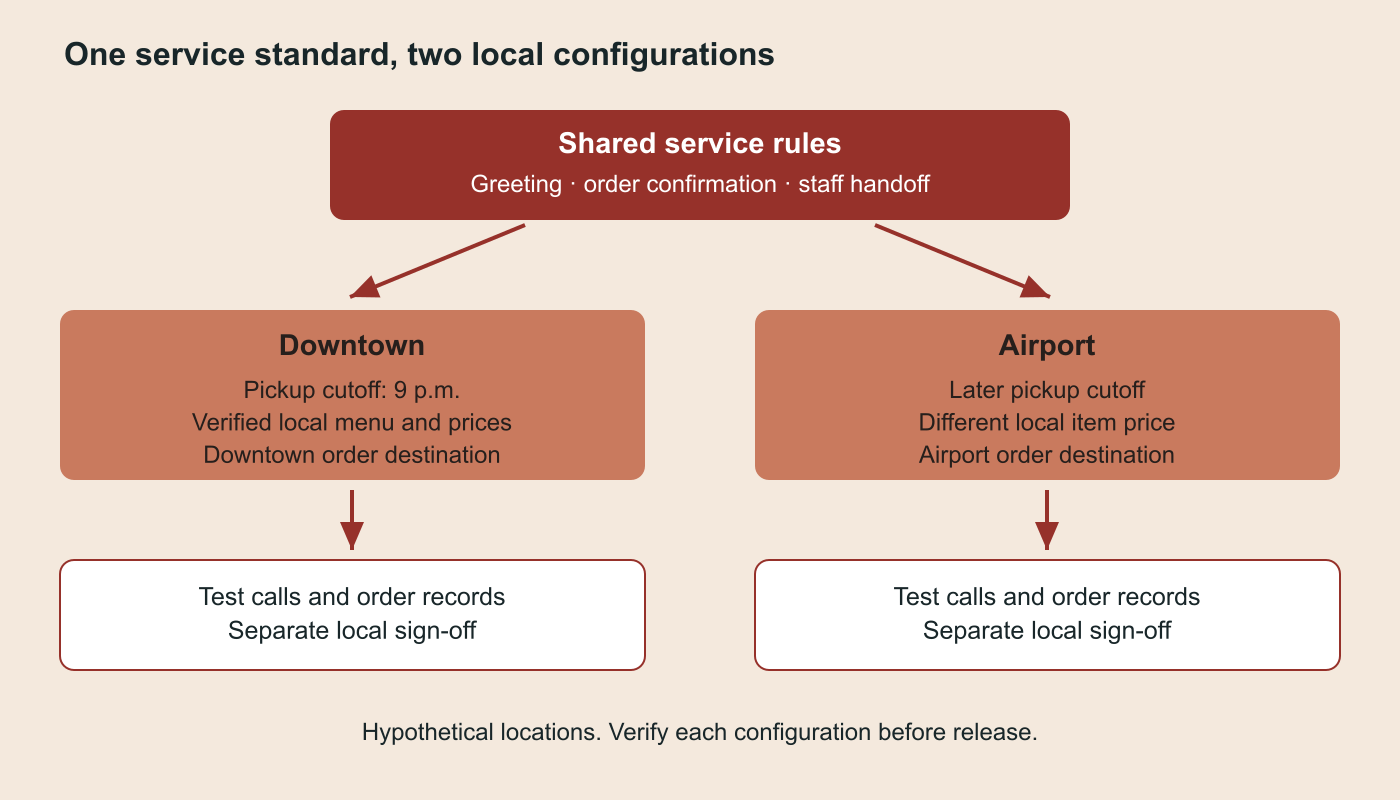
Use one operating playbook, with a verified configuration for each restaurant. Shared rules can cover the greeting, confirmation steps, and escalation policy; local records need the right menu, prices, hours, and pickup instructions. Answering a menu question, taking an order, and confirming that the order reached the restaurant are separate tasks. Order completion depends on the supported integration and its configuration at that location.
An AI receptionist for restaurants can support a group by covering defined routine calls and handing exceptions to staff. That may include overflow and after-hours questions, such as a caller asking about tomorrow's opening time. Shared standards can reduce variation, provided someone owns local updates, exceptions, and performance review.
Test the local differences before copying the setup
Consider a hypothetical two-location restaurant group. The downtown restaurant stops taking pickup orders at 9 p.m.; the airport location stays open later and charges a different price for one item. Both use the same greeting and order-confirmation rules. Before launch, test that a call to each number uses the correct restaurant, price, and cutoff.
If the ordering connection cannot confirm an order, the agent should explain the problem and follow the agreed staff-handoff process. The test establishes whether the setup works at each location.
Set shared rules for your restaurant phone ordering system
The National Restaurant Association's guidance on restaurant technology describes centralized menu updates across multiple locations. For phone service, the operational task is to verify that each local configuration receives the intended change.
Use this ownership table to connect shared service standards with restaurant menu management and local operating rules.
|
What to standardize |
What varies by restaurant |
Proposed owner and check |
|---|---|---|
|
Greeting, tone and common-question boundaries |
Name, address and local directions |
Group operations owns wording; site manager verifies a test call |
|
Menu structure and allowed order questions |
Items, modifiers, prices, promotions and availability rules |
Menu owner maintains the source; site manager tests the local menu and a changed price |
|
Service and confirmation policy |
Hours, holiday closures, pickup instructions and order cutoffs |
Site manager verifies weekday, holiday and after-hours scenarios |
|
Reservation-handling policy |
Reservation system, local rules and available actions |
Booking owner tests separately from food ordering |
|
Transfer policy and situations requiring staff |
Destination, coverage hours and backup contact |
Duty manager tests a live transfer and an unanswered transfer |
|
Release and review process |
Configuration version, connection status and approved local exceptions |
Rollout owner records sign-off and repeats affected tests after updates |
Record the authoritative source and the last verification date for each local value. If a location cannot supply an owner or a verified value, resolve that gap before enabling the affected workflow.
Check what the ordering connection actually completes
For example, Newo's PosHUB documentation describes placing, checking, and canceling orders after a specific location is selected. Its menu comes from a cached snapshot, refreshed on initial publication, a menu-publication webhook, or cache expiry, which defaults to six hours. An operator therefore needs to test both menu updates and actual order creation; the guide does not establish live inventory checks on every conversational turn.
Use Newo's integration directory to identify a possible connection, then check its setup guide and test the actions your location needs. Payment capture, kitchen receipt, substitutions, inventory checks, and reservations should not be assumed to be included in every connector.
Before expanding, confirm that the configured system answers the intended questions, places a supported test order at the correct location, and completes or escalates the request as expected.
Use a launch checklist at each location
Scaling an AI receptionist across multiple locations takes more than copying a setup and changing the phone number. Use the restaurant's normal safe test-order procedure and record the results of these checks:
- Identify the site. Call the published number and verify the greeting, address, timezone, menu, and intended order destination. Test the same request at a second site with a different price or cutoff.
- Verify order handling. Test an ordinary order, a required modifier, an unavailable item, and a caller changing their request. Confirm the resulting record in the intended system. If an action is unsupported, test the agreed staff route instead of assuming the AI can perform it.
- Verify changes and closures. Update a test menu value using the documented process and confirm when it becomes available to callers. Test a holiday closure and an order attempted after cutoff. Answering after hours must not imply accepting orders after the kitchen closes.
- Exercise handoffs and failures. Test a caller asking for a person, an uncertain menu question, an order-connection failure, and a transfer when the destination is unavailable. Name who receives the unresolved request and what the caller is told.
- Assign release ownership. Record the test result, configuration version, local sign-off, and a tested fallback to the previous phone process. Fix wrong-location routing, incorrect prices, and false order confirmations before expanding.
- Measure by location. Over a defined baseline and pilot period, compare answered calls / incoming calls; confirmed order records / unique eligible order requests; orders needing staff correction / confirmed orders; successful staff connections / attempted transfers; and menu-update delay from approved source change to verified call behavior. Inspect errors individually. Choose targets from the group's baseline and service standards, and keep unanswered transfers separate from successful handoffs.
Operators may need to join call logs and order records.
Start with a representative site, then test a second site with meaningful local differences. Expand in groups that the team can monitor, and rerun affected checks after changes to menus, hours, connections, or policies.
Reuse the approved playbook, then verify the next location's information, ordering connection, and handoff destination. A different menu or system may require additional setup. When brand rules change, name an owner to distribute the update, confirm the affected configurations, and retest the changed behavior. Staff continue to manage exceptions, guest service, and local operations.
Choose one location and document its menu source, order destination, and escalation owner. Test the restaurant phone ordering system against the checklist, then repeat the checks at a second site with different local rules. Use Newo's restaurant workflow as a starting point for evaluating the setup your group needs.