
Call center automation uses software to handle customer requests and the admin around them without an agent doing the work by hand. That covers answering routine questions, booking appointments, verifying callers, routing calls, and writing up notes after the call. The hard part is deciding what to automate first.
Most teams start with whatever the vendor demo showed. Your own call data is a better place to start. Look at which requests come in most often, how many steps each one takes, and what happens if the system gets one wrong. Once you score your processes on those three questions, the order of work mostly sorts itself out.
What call center automation means in 2026
For a long time, automation in a call center meant two things: a phone menu that asked callers to press 1 or 2, and scripts that copied data between systems overnight. Both are still in use, and for simple jobs they still work.
The newer piece is software that can hold the conversation. A Voice AI agent (or as we call it, a Voice AI employee) can now understand a request in the caller's own words and complete it in the systems you already use. A current one, like Newo, can book or move an appointment, or hand the caller to a person with the context attached.
With call center AI automation, work that used to need an agent moves into the automated column. Gartner predicts that by 2029, agentic AI will resolve 80% of common customer service issues without human intervention, reducing operational costs by 30%.
An automated call center today usually runs on five layers of technology:
- Phone menus and IVR, which route callers by keypad or simple voice commands
- Conversational AI, which talks with the caller and completes the request
- Agent assist, which supports a live agent during the call with suggested answers and next steps
- RPA (robotic process automation), which repeats clicks and data entry across back-office systems
- Integrations and orchestration, which pass data between your phone system, CRM, scheduling, and ticketing tools
Call center automation software rarely replaces all five at once. Most mid-market and multi-location operators add one layer at a time, beginning with the processes that pay back fastest.
The call center automation prioritization matrix: volume, complexity, and risk
Before you compare tools, pull 60 to 90 days of call data and list your top call reasons. Then score each one from 1 to 3 on three questions.
- How often does this request come in? That's volume. Score 3 if it's in your top 10 reasons by count.
- How many steps and systems does it take to finish? That's complexity. Score 3 if it's one lookup or one action, and 1 if it needs judgment or several systems.
- What happens if the automation gets it wrong? That's risk. Score 3 if a mistake is easy to fix, and 1 if it touches money, health information, or legal obligations.
Add the three scores. Processes scoring 8 or 9 go first, and those scoring 6 or 7 come next, once you have guardrails in place. A score of 4 or 5 means partial automation only, such as collecting details before a transfer. Anything lower stays with people for now.
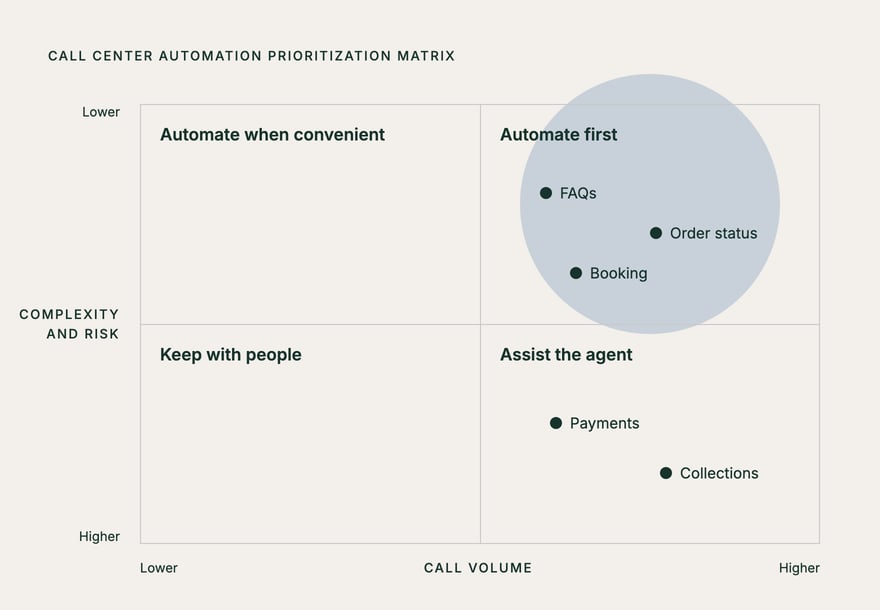
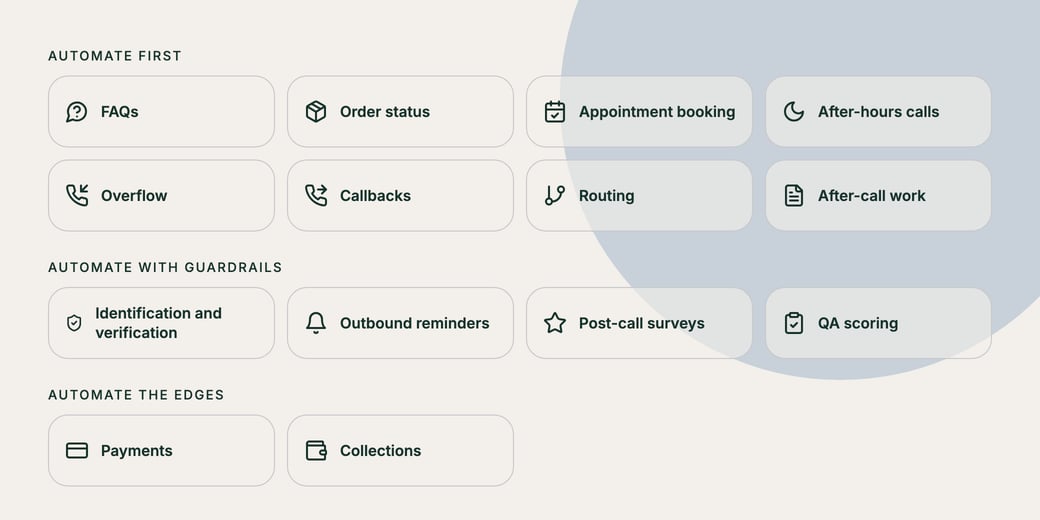
The 14 processes below usually fall into these tiers. Your scores will differ, so treat the table as a starting point.
| Tier | Typical score | Processes to automate | How to run it |
|---|---|---|---|
| Automate first | 8 to 9 | FAQs, order status, appointment booking, after-hours calls, overflow, callbacks, routing, after-call work | Full automation with a clear path to a person |
| Automate with guardrails | 6 to 7 | Identification and verification, outbound reminders, surveys, QA scoring | Automate the routine path; review exceptions and samples |
| Automate the edges | 4 to 5 | Payments, collections | Automate reminders, data capture, and secure handoffs; people make the decisions |
14 processes to automate, in order
Each process below comes with a starter rule you can adapt. Write yours in the same shape: what triggers it, what the automation does, and where it hands off to a person.
1. FAQs
Hours, locations, parking, pricing, policies, and "do you offer X?" questions are often the largest group of calls and the easiest to answer. The answers should come from a knowledge base you approve and keep current.
Rule to start with: if the question matches an approved answer, give it and offer a next step; if it doesn't, say so and transfer or take a message.
2. Order and service status
"Where's my order?" and "When is the technician coming?" need one lookup by order number, phone number, or name. That makes them good candidates for automation, as long as the AI can read your order or dispatch system.
Rule to start with: look up the record by caller ID first, confirm one detail, then read back the status; transfer if the record shows an exception or a delay over your threshold.
3. Appointment booking and rescheduling
Booking needs read and write access to your scheduling system, so check that integration before anything else. When it works, the caller hears real availability and hangs up with a confirmed slot.
Start with this rule: offer two or three open times, book the one the caller picks, and send a text confirmation; hand off anything outside your booking rules, such as double-length visits.
4. After-hours calls
Calls that arrive at night or on weekends usually go to voicemail, and many callers won't leave one. Automation can pick up, handle the routine requests above, and flag real emergencies.
Rule to start with: answer every call, resolve what's in scope, and page the on-call person for anything you define as urgent.
5. Overflow at peak times
When every agent is busy, an AI can take the next call instead of leaving it in the queue. It's often the safest first launch, because people still handle normal volume.
Rule to start with: route to automation when the queue passes a set wait time or length; keep the option to wait for an agent.
6. Callbacks
Callers who don't want to wait can ask for a callback, and the system calls them when an agent is free. Some teams have the AI handle the callback itself for in-scope requests.
Rule to start with: confirm the number and reason, give a realistic time window, and log the request against the caller's record.
7. Routing
Natural-language routing replaces "press 1 for billing" with "tell me what you're calling about," so the caller reaches the right team or location on the first try.
Rule to start with: route by intent and location, and send anything unclear to a general queue rather than guessing.
8. After-call work
Notes, dispositions, CRM updates, and follow-up emails can take minutes after every call. Automated summaries and write-backs give that time back, including on the calls agents still handle.
Rule to start with: generate a summary and disposition for every call, and have agents confirm or correct them for the first few weeks.
9. Identification and verification
Checking who's calling, by account number, date of birth, or a one-time passcode, is repetitive and follows fixed rules. It also guards access to personal data, which is why it sits in the guardrails tier.
Rule to start with: follow your existing verification policy step by step, lock the account after the same number of failed attempts a person would allow, and never read back sensitive data in full.
10. Outbound reminders and confirmations
Appointment reminders, delivery windows, and renewal notices are simple to automate. The rules for outbound calls are not. In the United States, the FCC ruled in February 2024 that AI-generated voices count as "artificial" voices under the Telephone Consumer Protection Act, so the same consent rules apply.
Rule to start with: call only contacts with recorded consent, identify your business at the start, and honor opt-outs immediately.
11. Post-call surveys
A short spoken or text survey right after the call usually gets more responses than an email a day later. Automation can ask the questions, record the score, and flag low scores for follow-up.
Rule to start with: ask one or two questions, and route any low score to a supervisor within the same day.
12. QA scoring
If your QA team reviews only a sample of calls, automated scoring can check every call against your scorecard (greeting, verification, resolution, and so on) and pull out the ones a person should listen to.
Rule to start with: auto-score every call, and have QA leads review the lowest-scoring calls plus a random sample to check the scoring itself.
13. Payments
Taking card payments over the phone triggers PCI DSS requirements, and mistakes cost money. So automate the parts around the payment: balance lookups, reminders, and sending a secure payment link or transferring to a PCI-compliant payment system.
Rule to start with: tell the caller their balance and send a secure link by text; transfer to a person for disputes or payment plans.
14. Collections
Collections calls involve money and regulation, and they can get emotional. Automation can send reminders and record promises to pay, but call-frequency rules apply. Under the CFPB's Regulation F, a debt collector is presumed to comply if it calls about a debt no more than seven times in seven days, and not within seven days after a phone conversation about that debt.
Rule to start with: automate reminders and payment-arrangement intake within your call-frequency limits, and send every dispute or hardship request to a trained person.
Technology for each process: IVR, conversational AI, agent assist, RPA, and integrations
Call handling software from the IVR era still works for simple routing. Conversational AI handles requests in the caller's own words. Agent assist helps people on the calls you keep. RPA and integrations do the back-office work.
| Process | Best-fit technology | What a Voice AI employee can do | Where people stay involved |
|---|---|---|---|
| FAQs | Conversational AI | Answer from your approved knowledge base | Keep the knowledge base current |
| Order and service status | Conversational AI with integrations | Look up the record and read back the status | Exceptions and complaints |
| Appointment booking | Conversational AI with integrations | Check availability, book, reschedule, confirm | Bookings outside your rules |
| After-hours calls | Conversational AI | Answer, resolve routine requests, flag urgent calls | On-call staff for emergencies |
| Overflow | Conversational AI with routing | Take calls when the queue is full | Normal volume |
| Callbacks | Conversational AI or dialer | Call back and handle in-scope requests | Complex callbacks |
| Routing | Conversational AI (replacing IVR menus) | Route by intent and location | Unclear requests |
| After-call work | Conversational AI and integrations | Summarize and write the outcome to your CRM | Spot-check summaries |
| Identification and verification | Conversational AI with policy rules | Run your verification steps | Failed or unusual checks |
| Outbound reminders | Conversational AI or dialer | Place consented reminder calls and texts | Consent records and opt-outs |
| Surveys | IVR or conversational AI | Ask and record survey questions | Follow up on low scores |
| QA scoring | Speech analytics | Supply transcripts for scoring | Calibrate the scorecard |
| Payments | Secure payment IVR or payment links | Look up balances and send secure links | Disputes and payment plans |
| Collections | Dialer with compliance rules, agent assist | Send reminders and take payment-arrangement details | Disputes, hardship, negotiation |
Agent assist is worth a look even if you automate a lot, because it improves the calls people keep. In a study of more than 5,000 customer support agents, researchers at Stanford and MIT found that access to a generative AI assistant raised issues resolved per hour by 15% on average, with the largest gains among less experienced and lower-skilled agents.
ROI benchmarks and a worked example
Few reliable, independent ROI benchmarks exist for call center automation. Many figures come from vendor case studies, so check how each one measured its results before you rely on them. The two figures above are the most useful neutral reference points: Gartner's forecast of a 30% reduction in operational costs by 2029, and the 15% productivity gain from agent assist in the Stanford and MIT study. Use them to sense-check a business case, then build yours from your own call data.
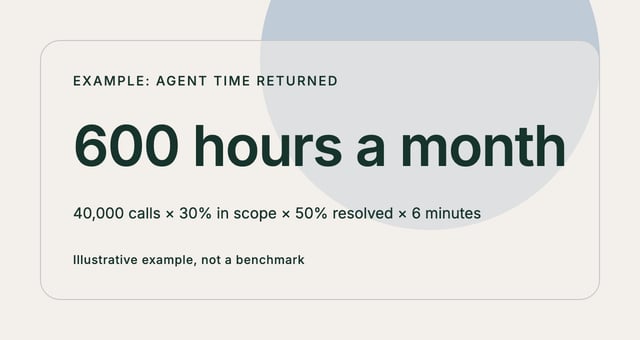
These inputs for one process tier are illustrative, so swap in your own numbers.
- Monthly inbound calls: 40,000
- Share that falls into your "automate first" processes: 30%, or 12,000 calls
- Share of those the automation fully resolves: 50%, or 6,000 calls
- Average handle time, including after-call work: 6 minutes
- Agent time returned: 6,000 × 6 minutes = 36,000 minutes, or 600 hours a month
- Loaded hourly cost: the BLS median wage for customer service representatives was $21.53 an hour in May 2025; at an assumed 1.3× for benefits and payroll taxes, that's $27.99
- Monthly value: 600 hours × $27.99 = $16,794
- Annual value: $16,794 × 12 = $201,528, before the cost of the automation
Subtract the annual cost of the automation at that volume, including setup and staff time to maintain it, to get a net figure. Keep two things in mind. Hours returned don't turn directly into fewer people, because coverage and schedules still matter. And revenue from after-hours bookings is often worth more than the labor savings, so count it separately.
Rollout plan and change management
Roll out in small steps you can measure.
- Record a baseline for each process before you change anything: call volume, call reasons, handle time, abandonment, and after-hours volume.
- Pick two or three processes from the "automate first" tier. A common pairing is FAQs plus one transactional process, such as booking.
- Test against real calls. Replay your most common call reasons, plus the awkward ones, before any customer hears the system.
- Launch on overflow or after-hours calls first, so people still handle the main line while you check results.
- Review weekly, fix what failed, and add the next process only when the current ones meet your targets.
Plan for your agents as carefully as you plan the software. Tell them early which calls are moving and why, and ask them to help write the starter rules and own the handoff experience, since they know where callers get stuck. If you run more than one site, our multi-location rollout plan covers location-specific rules, a launch checklist, and how to expand site by site.
Mistakes to avoid
- Don't automate a broken process. If callers ring back because the answer was wrong, automation repeats the error faster, so fix the process first.
- Measure requests completed instead of calls deflected. A call that ends without the task done often comes back as a second call.
- Keep the way out visible. Callers should always be able to reach a person, and that person should get the context so the caller doesn't have to repeat themselves.
- Don't launch outbound calls without consent records. TCPA consent rules apply to AI voices too.
- Give the knowledge base an owner. Prices, hours, and policies change, and stale answers quickly erode trust.
- Wait for data before cutting staff. Measure for at least a few weeks, then decide how to redeploy the time.
- Don't overlook after-call work. Few people notice it, and it's one of the easiest processes to automate.
How Newo's Voice AI employee covers the processes to automate first
The "automate first" tier is where Newo's Voice AI employee fits most directly, and we recommend deploying it with the guardrails above.
- For FAQs, it answers from a knowledge base built from your website and the documents you add, and you can review what it has learned before it goes live.
- For order status, booking, and after-call work, it connects to scheduling, CRM, field service, and point-of-sale systems, and writes the outcome back to your CRM before the call ends.
- For after-hours calls and overflow, it answers your existing number, takes unlimited simultaneous calls, and covers nights and weekends.
- For routing, it replaces the IVR menu and routes callers to the right location with that location's hours and services.
- For callbacks and reminders, the same agent runs callbacks, confirmations, and follow-ups by voice and SMS.
- At handoff, it tells the caller before transferring to a person, then transfers, and tracks every promised action until it's done.
Conversations run voice-to-voice, so callers can interrupt or change their mind, and the agent keeps up. It works with your existing telephony, so your number and routing stay where they are. Newo's security covers ISO/IEC 27001:2022, SOC 2 Type 1, HIPAA with a signed BAA, and GDPR, with 256-bit encryption. Keep payments and collections with your people and your existing secure payment systems.
Start with your call data, score your processes, and test the top three on any platform you're considering, Newo included.
Want to hear how it handles your top call reasons? Create your own Voice AI employee and test it on the processes you'd automate first.
Frequently asked questions
What is call center automation?
Call center automation uses software to handle customer requests and the admin around them without an agent doing the work by hand. It includes IVR menus, conversational AI that talks with callers, agent assist, RPA for back-office tasks, and integrations that update your CRM and scheduling systems. Most teams start with high-volume, low-risk requests such as FAQs and bookings.
What is the 80/20 rule in a call center?
It's a service-level target: answer 80% of calls within 20 seconds. Many call centers use it as a default benchmark, though no standards body sets it, and some teams aim higher. People also use "80/20" in the Pareto sense, where a small share of call reasons drives most of the volume. Both help you decide what to automate.
What are the top 5 automation tools for call centers?
The five main categories are IVR and phone menus, conversational AI or Voice AI agents, agent assist, robotic process automation (RPA), and integration or orchestration tools that connect your phone system to your CRM. Most call center automation software combines two or more of these. Choose by process: conversational AI for requests callers make in their own words, RPA for back-office data entry.
Is AI eliminating call center jobs?
So far it's mostly changing them. The BLS projects customer service representative employment will decline 5% from 2025 to 2035, partly because companies are automating more tasks, yet it still expects about 289,500 openings a year. Routine calls move to automation, and people keep the conversations that need judgment.
What is the difference between AI call center automation and an IVR?
An IVR routes callers through a fixed menu of options. AI call center automation understands requests in the caller's own words and can complete them, such as booking an appointment or checking an order, then hand off to a person with context. Many teams keep a simple IVR for routing and add conversational AI for the requests that need a conversation.
How long does call center automation take to set up?
A single process, such as FAQs or after-hours coverage, often goes live in days to a few weeks once your knowledge base and integrations are ready. A full program across many processes and locations takes longer because each one needs testing, staff training, and review. Start with overflow or after-hours calls to learn before you switch your main line.