A virtual receptionist answers your business's phone calls from somewhere other than your front desk. It greets callers in your company's name, answers routine questions, books appointments, takes messages, and transfers calls to the right person.
The trouble is most vendors sell three very different things under that name: a trained person at a remote answering company, a Voice AI agent, and the phone menu that asks callers to "press 1." Before comparing prices, it helps to know which one you're looking at and which one you actually need.
Why the phone still matters
Customers use chat and email, but they still pick up the phone when something matters: booking, rescheduling, an urgent problem, a big purchase. And a lot of those calls go unanswered.
When call-tracking company CallRail analyzed 1.1 million conversations for its 2025 benchmark report, healthcare businesses missed 32% of their calls, legal firms 28%, home services 14%, and real estate 9%. Response time matters too. Research published in Harvard Business Review found that companies that responded to a lead within an hour were nearly seven times more likely to qualify it than those that waited even one hour longer.
A virtual receptionist closes that gap. It answers every call, and the next step happens while the caller is still on the line.
The three things called a "virtual receptionist"
| Live virtual receptionist | AI virtual receptionist or Voice AI employee (Newo) | Auto attendant (IVR) | |
|---|---|---|---|
| Who answers | A trained person at a remote service | AI software that holds a spoken conversation | A recorded menu |
| What it can do | Greet, answer FAQs, take messages, transfer, often book | Greet, answer FAQs, book, reschedule, qualify, transfer, update your systems | Route callers by keypad or simple voice commands |
| Availability | Depends on plan; nights and weekends often cost extra | 24/7, unlimited simultaneous calls | 24/7 |
| Typical pricing | Per minute, per call, or monthly bundles | Usage-based (per minute or per call) or monthly plans | Usually included with a phone system |
| Best at | Sensitive, emotional, or unusual calls | High volume, long hours, repeatable requests | Simple routing when callers know where they want to go |
A live virtual receptionist service is a team of call center agents who answer for multiple businesses at once, following your script. Call quality depends on who answers and how well they've been briefed.
An AI virtual receptionist (or as we call it, a Voice AI employee) is software that answers the phone and talks with the caller. A current one, like Newo, can handle free-form requests like "I need to move my Thursday cleaning, can you do Friday morning?", check real availability, and update your calendar or CRM.
An auto attendant, or IVR, is the phone tree. Some phone systems market it as a virtual receptionist, but it can only route calls. It can't hold a conversation or answer a question. It also feels impersonal. Every caller hears the same recorded script, and nothing on the other end acknowledges why they called.
Two neighboring terms cause confusion. An answering service usually means message-taking and after-hours overflow, which is the lighter end of a live service. A virtual assistant handles admin work like email and calendars, and usually doesn't cover the phone in real time. If missed calls are the problem, an assistant won't fix it.
What happens when a call comes through to a Voice AI employee?
- You forward your existing number to the Voice AI employee: all calls, only the ones you miss, or only after hours. Your number stays the same.
- It answers in your name ("Thanks for calling Lakeside Dental, how can I help?"), so to the caller it sounds like your office.
- It works out what the caller needs, whether that's a question about hours or insurance, a new booking, a reschedule, a billing issue, or an emergency.
- It acts on the request. It answers from your approved information, books into your scheduling system, takes a detailed message, or transfers the call live to a person.
- It leaves a record: a summary, a transcript, a new appointment, or a CRM entry, so nobody has to rebuild the conversation from a sticky note.
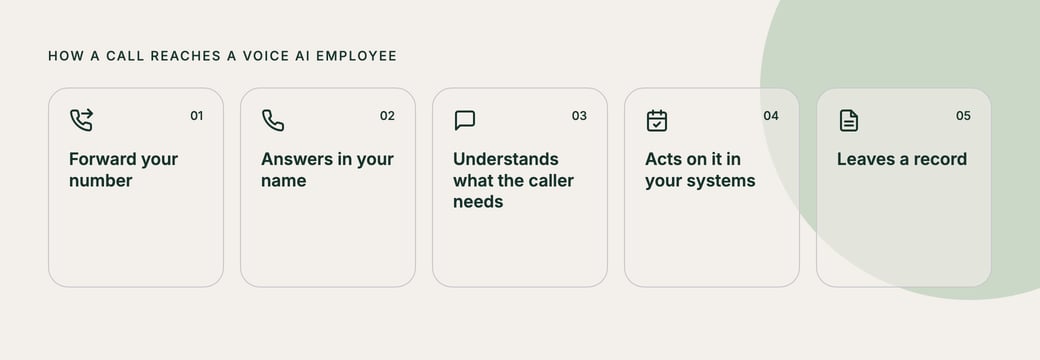
Step 4 is where the three types split apart. An IVR can only route. A live service can usually book if it has access to your calendar. A well-integrated Voice AI employee can complete the task inside the systems you already use.
How AI virtual receptionists work
You don't need to be technical to buy one. But one design choice explains most of the difference between AI receptionists that sound natural and ones that sound like a robot.
The traditional design is a cascade. The system turns the caller's speech into text, sends the text to a language model to decide what to say, then turns the reply back into speech. Each hop adds delay. Once speech becomes plain text, the system loses anything carried in the voice itself, like hesitation or emphasis.
Voice-to-voice (speech-to-speech) systems work more directly with audio instead of routing everything through a transcript. When done well, the pause before the agent replies shortens, and turn-taking feels closer to a normal phone call. The caller can interrupt, change their mind halfway through a sentence, or stop to look something up, and the agent doesn't talk over them.
This matters because long pauses and talk-over are what push callers to say "representative" or hang up. Ask vendors which approach they use, then listen for yourself on a live test call where you interrupt it (see the checklist further below).
Two other things separate an AI receptionist that answers calls from one that resolves them. The first is integrations: can it read and write to your scheduling system, CRM, practice management software, or ticketing tool, or does it just email you? The second is guardrails. Ask how it avoids making things up. You want answers grounded in information you've approved, with clear escalation rules. A good agent will say "let me get someone for you" rather than guess.
Where AI call routing goes wrong, and how we fixed it
Most failures of a Voice AI employee don't show up in the conversation. The caller hears a polite answer and gets transferred. The mistake appears later, in the transfer log, when someone checks which number the call went to.
At Newo, we learned this building phone routing for a Northern California network of clinics with 40 destination lines, and for a Mexican fintech with 17. Three cases show what to check for in any vendor.
A made-up number
The model joined the start of one phone number to the end of another. The result matched no line in the routing table. Nothing checked whether the number existed, because, to the model, a phone number is just text.
The fix we're moving to: the model picks a routing line by its ID, and code looks up the number. The model never writes digits.
Right phrase, wrong line
A caller said "Residency." The agent didn't ask which one, so it guessed, and the call went to the wrong of two lines with that label. The agent picked the number from what they said out loud, so the rule had to control speech: once a label maps to a full name, the agent says the full name every time.
If the answer to the department question is empty or garbled, the agent re-asks instead of choosing a department itself.
Same agent, different hours
One agent covered four schedules: business hours, an early period, evenings, and nights and weekends. Each had its own greeting, intents, and routing table. Code decided which schedule applied at the start of each call, so the model never had to work out the time. Holidays and special dates were set explicitly rather than inferred.
"What matters is not what the agent thinks, but what it says."
What a virtual receptionist costs
Prices vary widely by type and volume, so compare the total monthly cost at your real call volume rather than headline rates.
Live services usually bill per minute, per call, or as a monthly bundle of minutes. Check the overage rate, whether the provider rounds each call up to the next full minute, and whether it charges surcharges on nights, weekends, and holidays. Booking, bilingual support, and CRM integration are sometimes paid add-ons.
AI receptionists usually bill by usage (minutes or calls) or on a monthly plan, and at volume, the per-call cost is usually lower than live service. In exchange, someone on your side owns the setup, including the knowledge base and escalation rules.
An in-house receptionist is the baseline. The U.S. Bureau of Labor Statistics puts the median pay for receptionists at $18.27 an hour, or $38,010 a year, as of May 2025. That's before benefits and payroll taxes, and it covers about 40 hours a week.
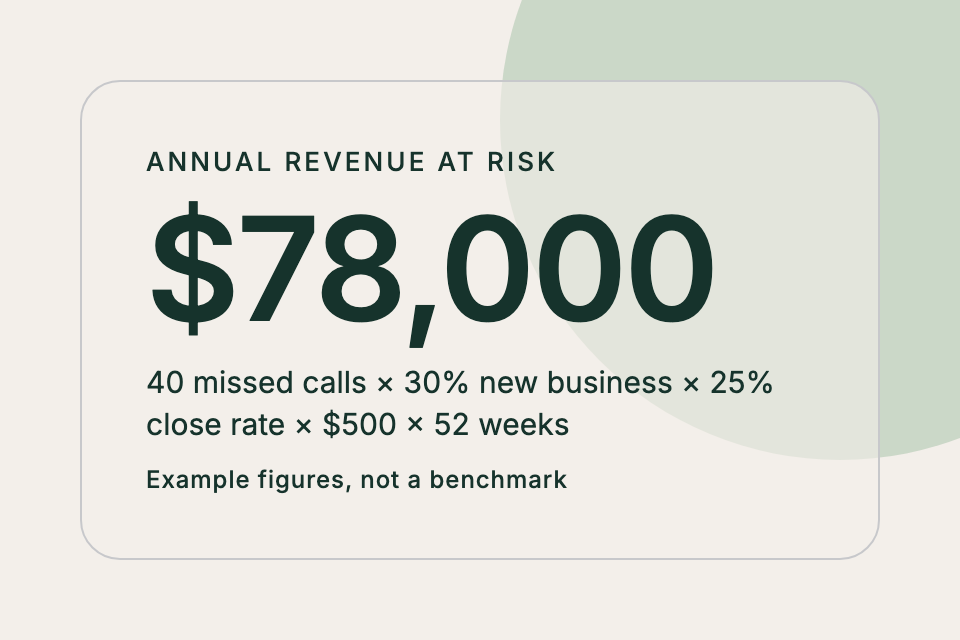
The number most businesses never calculate is what missed calls already cost them:
Missed calls per week × % that are new business × close rate × average customer value × 52 = annual revenue at risk
Say you miss 40 calls a week, 30% are new business, you close 25% of those, and an average customer is worth $500. That's $78,000 a year. Plug in your own numbers. If the result is bigger than the cost of any option above, you already know you need to fix missed calls; the only question is which option fits.
Who benefits most from a Voice AI employee
A virtual receptionist pays off fastest if any of these sound familiar:
- You miss calls at peak times because the front desk is busy with the person in front of them.
- You need coverage on nights and weekends, when emergencies, bookings, and leads still come in.
- You run several locations, callers get different answers depending on which office picks up, and you can't see call outcomes across sites in one place.
- Your call volume is seasonal or spiky, so staffing for the peak means overpaying the rest of the year.
- Most calls are repeatable: hours, directions, pricing, availability, booking, rescheduling, order status.
Multi-location businesses get the most out of it. One receptionist can answer for every location, provide location-specific information, route calls to the right site, and report every call the same way. Image Orthodontics, a practice with 15 locations across the San Francisco Bay Area, found it was missing nearly 20% of inbound calls during peak and after-hours periods.
When it isn't the right fit
If you get a handful of calls a day and can answer them yourself, you may not need one yet. If nearly every caller needs a licensed professional on the spot, a receptionist will mostly end up taking messages.
Setup is the other common failure. A receptionist, human or AI, only knows what you give it, and a thin knowledge base produces vague answers.
Regulated information needs the right paperwork. In healthcare, confirm the provider will sign a Business Associate Agreement (BAA) before any protected health information goes through it. In any industry, ask for security documentation such as SOC 2 or ISO 27001.
Many businesses settle on a hybrid. AI handles first contact, after-hours calls, and overflow, while staff handle escalations and in-person work.
A 10-point test before you buy a Voice AI employee
Before you forward your main line, put any option, human or AI, through these checks using your own test calls.
- Interrupt it. Start a question, stop, and change your mind. Does it adapt, or does it talk over you?
- Ask something it shouldn't know. Does it admit it doesn't know and offer a next step, or does it make up an answer?
- Book an appointment, then reschedule it. Does it show up correctly in your real system, and does the change stick?
- Ask for a person. How quickly and cleanly does it transfer, and does your team get context with the call?
- Call after hours. Is the experience the same at 9 p.m. on a Sunday?
- Call from a car or a noisy room. Does accuracy hold up?
- Try a second language your customers speak.
- Look at what you receive afterward: summary, transcript, recording, CRM record. Is it useful without replaying the call?
- Ask about security: BAA availability, SOC 2 or ISO 27001, data retention, and who can access recordings.
- Price your real month. Give them last month's call count and average call length, and ask for a total that includes overages and add-ons.
How Newo answers every call and passes the 10-point test
Any of the three options can answer your calls in your name. A live service still suits calls that need nuance, and plenty of businesses keep people on those. For high volume and long hours, we built Newo's Voice AI employee around the checks above, and we've tested it against every item on the 10-point checklist.
It answers every call in your business's name, 24/7, including nights and weekends. Conversations run voice-to-voice, so callers can interrupt or change their mind, and it keeps up. It connects to your scheduling system and CRM to book, reschedule, and log the call while the caller is still on the line. Answers come from information you've approved, and when a call needs a person, it hands off to your staff with the context attached. If you run several locations, one Voice AI employee can answer for all of them and report every call the same way.
Newo's security covers ISO/IEC 27001:2022, SOC 2 Type 1, HIPAA with a signed BAA, and GDPR, with 256-bit encryption. Start by finding out how many calls you miss each week, then run the 10-point test on anything you're considering, Newo included.
Want to hear how it handles calls like yours? Create your own Voice AI employee and put it through the test.
Frequently asked questions
Is a virtual receptionist a real person or AI?
It can be either. The term covers live remote receptionists and Voice AI agents, and sometimes phone menus. Confirm which one a provider is selling before comparing prices.
What's the difference between a virtual receptionist and an answering service?
An answering service mainly takes messages and passes them on. A virtual receptionist greets callers in your name, answers questions, transfers calls, and often books appointments. The labels overlap in practice, so compare what each plan includes.
Can a virtual receptionist book appointments?
Yes, if it's connected to your scheduling system. AI receptionists usually book and reschedule during the call. Message-only answering services usually can't.
Do callers know they're talking to AI?
It's good practice to say so in the greeting. Modern AI voices sound natural, but being upfront builds trust, and you decide how the agent introduces itself.
Will an AI virtual receptionist replace my front desk?
Usually it supports them. It handles repetitive calls and overflow and covers after hours, so staff can focus on in-person interactions and calls that require judgment.
How long does setup take?
Live services need time to learn your script during onboarding. You can often build an AI receptionist from your website and documents quickly, but leave time to connect your systems and test real scenarios before going live.