Early Detection of Configuration Issues with New Health Check Feature
.png?width=44&height=44&name=exec-c4ae2cb2-246f-46af-9260-530b2e7fab8c%20(1).png)
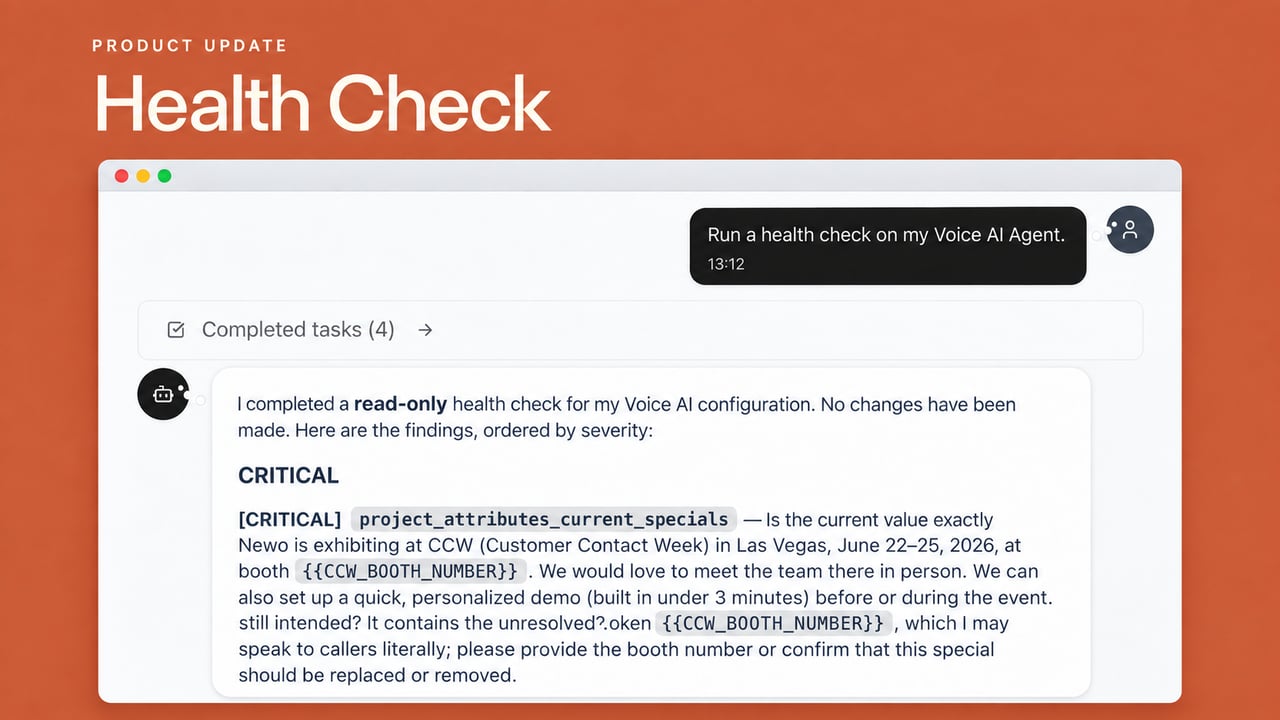
A Newo Voice AI Agent depends on many connected decisions. Phone routing, integration credentials, business hours, workflows, and transfer rules all have to work together. One outdated detail can turn an ordinary customer call into a missed one.
The difficult part is that a configuration can look finished and still contain a gap. A change may be saved, but that does not tell you whether the rest of the setup supports it. Teams often find out only after a transfer fails, an integration disconnects, or a customer notices unexpected behavior.
Today we’re introducing Health Check, a new capability in Vibe Mode that reviews a Newo Voice AI Agent’s configuration on request. It tells you in plain language what is working, what needs attention, and where to look next.
Check the work in the same conversation
Vibe Mode already gives customers and partners a conversational way to configure a Newo Voice AI Agent. Health Check brings verification into that conversation too.
Instead of opening several screens and checking settings one by one, you can ask a direct question. Vibe Mode walks through the configuration and returns an answer you can act on. A broad request can review the full setup. A focused request can check whether a recent change saved correctly or whether a connection is working as expected.
The idea is straightforward: the place where you make a change should also help you check the change.
Ask for a full review
Start with:
“Run a health check on my Voice AI Agent.”
Vibe Mode reviews the configuration and flags anything that needs attention. Depending on the Voice AI Agent’s setup, that review can cover:
- required configuration information
- phone routing and transfer rules
- integrations and credentials
- business hours and workflows; and
- capabilities that were configured or changed recently.
Health Check reports what it finds in the conversation. If the setup looks right, you get confirmation. If something is off, it explains the problem and guides you toward the next action.
Check a specific change before you move on
Not every question needs a full review. After changing one part of a Voice AI Agent, ask Vibe Mode to check that part directly.
For example:
“Did my Salesforce integration save correctly?”
Vibe Mode checks whether the integration is connected and pulling data. If it is not, Health Check tells you what needs to be fixed.
This is useful after updating a credential, changing a route, or configuring a new capability. You can check the work while the change is still fresh instead of waiting for a problem to show up elsewhere.
Turn a problem into a next step
Finding an issue is only useful if the result tells you what to do with it. Health Check does more than point to a setting. When it detects a problem, it explains what is wrong and guides you toward the action needed to resolve it.
That changes the troubleshooting conversation. Customers do not have to translate an error into a technical diagnosis. Partners do not have to begin every review by retracing the entire account setup. Both can start with a clear description of the problem and the part of the configuration involved.
Health Check also makes routine checking easier to repeat. Run it after an update, review the result, address anything it flags, and then continue with the rest of your testing.
Catch small gaps before customers find them
As Voice AI Agents take on more work, their configurations become harder to inspect by eye. A missing field or outdated setting can affect the customer experience even when the rest of the setup is correct.
Health Check helps catch those gaps before they become missed calls, failed transfers, disconnected integrations, or unexpected agent behavior. A saved change tells you the configuration was recorded. Health Check helps you verify that the surrounding setup still works as expected.
For customers, that means a clearer way to maintain a Newo Voice AI Agent without deep technical knowledge. They can ask a question in Vibe Mode, understand the answer, and take the next step.
For partners, it means less time spent manually reviewing accounts, tracing configuration issues, or involving support at the start of every investigation. That makes it easier to give customers a consistent onboarding and support experience as the number of accounts grows.
Know what Health Check can and cannot tell you
Health Check reviews configuration and connections. It can tell you when a setting is wrong or when a connection has a problem, but it will not catch every judgment call that may surface in a live conversation.
Treat it as the first pass, not the last one. Use Health Check to find configuration problems, then test the Voice AI Agent in the situations your customers will encounter. A clean configuration is the starting point for a good conversation, not a substitute for listening to one.
Run Health Check
The next time you change a Newo Voice AI Agent, ask Vibe Mode:
“Run a health check on my Voice AI Agent.”
Review what it finds and address anything it flags before the change reaches a customer. Health Check gives Vibe Mode a more active role in maintaining a Voice AI Agent: helping you configure the work, check the work, and put the conversation to work.