The schedule may live in Cloud 9 ortho software, but the patient experience lives in the moment someone calls. After hours, at lunch or during a front-desk rush, the path from question to appointment can still change from one location to the next.
Newo Voice AI connects to Cloud 9 ortho software. During a call, it can identify the patient, check availability and book or change an appointment. It can also capture insurance details and handle family scheduling within the practice’s rules.
For leaders at orthodontic service organizations (OSOs), dental service organizations (DSOs) and larger multi-location practices, Newo adds coverage for patient calls without changing the system staff already use. Each organization decides what Newo can do and when staff take over.
Key takeaways
- Newo uses live Cloud 9 data to identify patients, check availability, book or update appointments and route exceptions during the call.
- Orthodontic leaders can apply approved scheduling and escalation rules across locations, measure completed outcomes and expand only after the workflow meets their standard.
- Vibe Mode lets permitted users speak with an in-app conversational AI to change how their Voice AI behaves, including business details, conversation flows and enabled features, without editing technical settings directly.
How Newo works with Cloud 9 ortho software
Planet DDS describes Cloud 9 as cloud-based orthodontic practice management software for practices, multi-location organizations and orthodontic service organizations. It brings together scheduling, patient information, financial workflows, communications and organization-wide visibility.
Newo connects each patient conversation to the live Cloud 9 context behind it. During a call, Newo can identify the correct patient, retrieve appointments, search approved availability and complete supported actions in Cloud 9, such as booking or updating a visit.
Cloud 9 remains the practice management system. Newo handles the conversation, follows the practice’s rules and either completes the approved next step or hands the request to staff with the relevant context.
That is different from an answering service that only takes a message or a disconnected AI that can answer a question without completing the work. Newo can carry an approved outcome into Cloud 9 or route the request to staff when judgment is required.
Why patient access gets harder across multiple locations
Multi-location organizations have already solved one consistency problem by standardizing on a PMS. Patient access introduces another.
Demand does not arrive evenly. One office may be quiet while another has every phone line occupied. A parent may call after hours because that is the first uninterrupted moment in their day. A returning patient may use a different phone number, ask about a child and then switch the conversation to another family member. A new patient may know the city they prefer but not which provider or appointment type they need.
The front desk must handle all of that while welcoming patients in person, managing clinical priorities and responding to requests that require human judgment.
Growth magnifies the variation:
- Different offices have different hours, schedules and providers.
- Appointment types and schedule views can vary by location.
- The same patient question may receive a different answer at each office.
- Overflow at one location does not automatically become capacity at another.
- Central leaders need visibility and consistency without taking control away from local teams.
- Adding locations can create pressure to add equivalent front-desk workload.
A Cloud 9 customer story from The Braces Place shows why access to patient data and consistent reporting matter when an orthodontic practice operates across multiple locations.
Because every office already uses a single PMS, such as Cloud 9, Newo can apply the correct location, patient, appointment and escalation rules during the call.
What Newo Voice AI can do with Cloud 9
The Newo Cloud 9 integration is designed for common front-desk conversations. It works from live Cloud 9 patient, appointment and availability data and can complete actions directly in Cloud 9.
Identify the correct patient in family calls
Newo first establishes who is calling and who the requested appointment action is for. Those are not always the same person.
An existing patient can be identified from a matching phone number. If a returning patient calls from a different number, Newo can use their name and date of birth as a fallback. If more than one record could match, Newo asks for a disambiguating detail instead of guessing.
The same care applies to family scheduling. Newo can use an existing child’s Cloud 9 record, or collect the required details for a new dependent and link that person to the responsible party when the relationship can be mapped safely. If the relationship is unclear, it offers front-desk help rather than exposing internal labels or forcing a match.
Look up upcoming appointments
Once the patient and appointment target are clear, Newo can retrieve upcoming Cloud 9 appointments and read the relevant information back to the caller.
This supports everyday questions such as, “What time is my appointment on Friday?” It also prevents later actions from relying on a previous conversational reference or the wrong family member’s information.
Search live availability and book an appointment
Newo asks what brings the patient in, maps the answer to the practice’s configured visit reasons and searches the appropriate Cloud 9 schedule view. Planet DDS’s guidance on Cloud 9 schedule templates explains how template configuration supports appointment-search workflows. Newo offers current Cloud 9 openings and runs a new search when availability changes.
The practice controls how many days ahead Newo may search, up to a seven-day booking window. If a requested time is unavailable, Newo can offer nearby alternatives. If a selected slot disappears before booking, it runs a fresh search rather than claiming the appointment succeeded.
For new patients, Newo collects the required patient information before creating the Cloud 9 record and booking the selected slot. Date of birth is required, which prevents incomplete records that would create more work later.
Reschedule, confirm or cancel an existing appointment
Newo can identify the exact appointment, check live replacement availability and reschedule it in Cloud 9. It can also confirm an existing appointment or apply a soft cancellation that remains visible to the front desk.
Each of these actions can be enabled or disabled separately. If cancellation is disabled, Newo offers front-desk help instead.
Capture insurance information for staff verification
Before a booking is submitted, Newo can ask for the caller’s dental insurance information, including the carrier, plan, member ID and group. The caller may also say they are self-pay or do not have the information available.
Newo records the information provided in Cloud 9 patient and appointment notes so the front desk can pre-verify coverage. It does not validate eligibility or modify financial data. That distinction keeps the workflow useful without pretending that information capture and insurance verification are the same job.
Route visit reasons and exceptions safely
Practices can define visit-reason rules using the Cloud 9 schedule views they already use, such as new-patient exams, orthodontic consults, recalls or urgent concerns. This helps Newo search the right part of the schedule rather than treating every caller as the same appointment type.
These rules organize the scheduling path; they do not turn Voice AI into a clinician. Requests that need clinical judgment, fall outside the approved workflow or cannot be resolved safely should be transferred or sent for a callback.
Here are a few common examples of patient requests and how Newo uses Cloud 9 or forwards a call to a human:
| Patient access request | Workflow completed by Newo in Cloud 9 | Escalation and routing rule |
|---|---|---|
| “I want to book a consult.” | Classifies the visit reason, checks live availability and books a selected slot | The request falls outside configured appointment rules |
| “Can we move my daughter’s appointment?” | Identifies the caller and child, retrieves the exact appointment and searches replacement times | The patient or appointment cannot be identified confidently |
| “What time am I coming in?” | Retrieves upcoming appointments for the selected patient | Multiple records remain ambiguous |
| “I need to cancel.” | Confirms the patient and appointment before applying a soft cancellation | Cancellation is disabled or the caller asks for a person |
| “I have an urgent problem.” | Applies the practice’s visit-reason rules and searches the appropriate schedule view | Clinical judgment or immediate personal attention is required |
HEAR NEWO IN ACTION
Experience an orthodontic booking call.
Hear how Newo uses live Cloud 9 context to find availability and move the right patient request forward.
How to roll out Newo Voice AI across orthodontic locations
1. Start with one clear job
Choose a repeatable call type with a clear outcome, such as new-patient booking, appointment lookup or after-hours scheduling.
2. Set the boundaries and test them
Define the locations, visit reasons, schedule views, booking window, supported actions and escalation rules Newo should follow in Cloud 9. Test family calls, ambiguous patient matches, changing dates, disappearing time slots and requests for a person.
3. Measure the outcome, then expand
Use Newo’s dashboard to review completed bookings, after-hours activity, exceptions and call summaries.
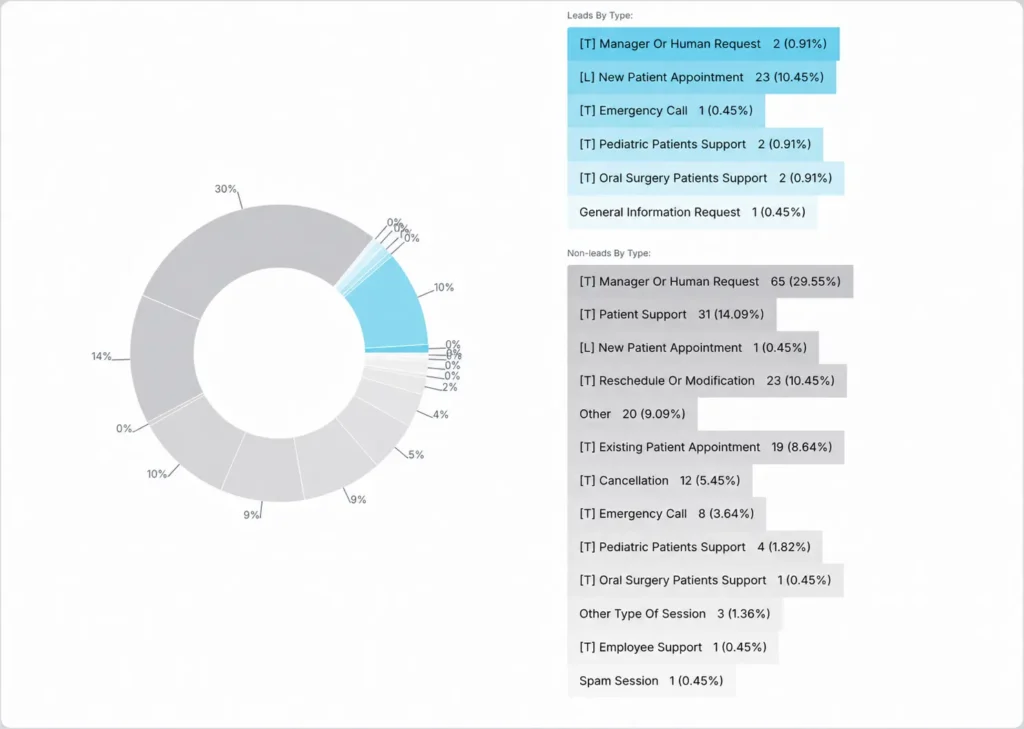
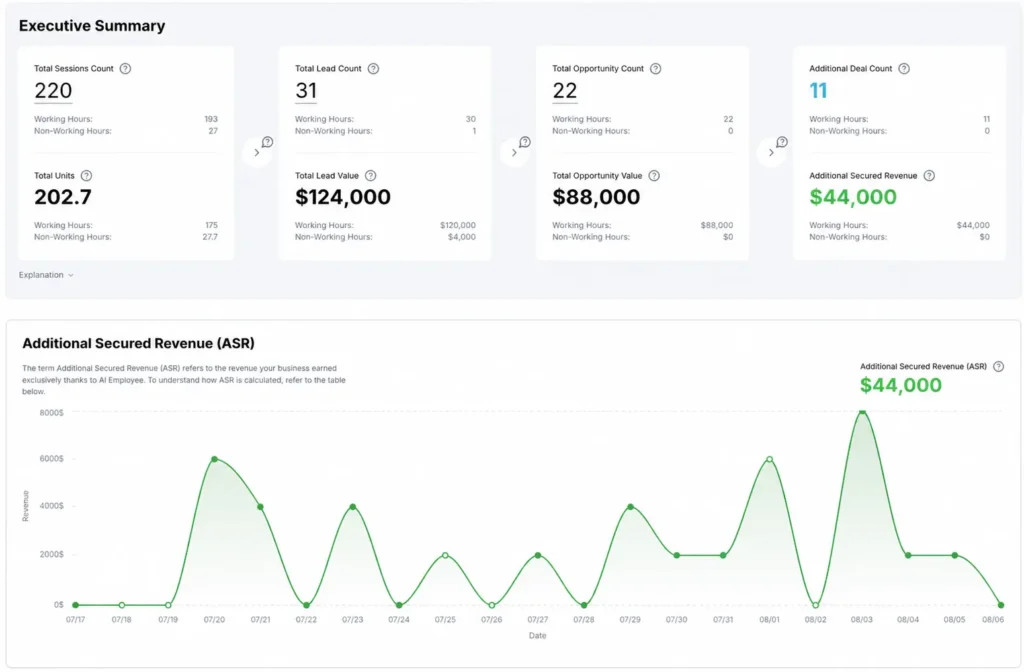
Add more locations, appointment types or actions only after the first workflow performs reliably.
How Voice AI adds capacity across multi-location orthodontic practices
The business case depends on how much patient work Newo completes without adding the same amount of front-desk workload as the organization grows.
Newo can create value in four connected ways:
Capture more demand
Give more new-patient, overflow and after-hours inquiries an immediate path to real availability and a booked next step. A prospective patient who cannot reach a practice or book right away may simply return to Google and choose another provider, so speed matters most while intent is high.
Protect staff attention
Move repeatable appointment work away from the moments when front-desk teams are helping patients in person or handling requests that need human judgement and clinical coordination.
Create consistency across locations
Use the organization’s approved information and workflows while applying the correct location, schedule view and patient context. Newo can adopt the organization’s brand voice, terminology and conversational style, helping every location deliver a consistent experience without erasing legitimate local differences.
Grow without matching workload location for location
Extend a proven conversational job to more offices after it has met the organization’s standards, rather than rebuilding the process for every new location.
| Business outcome | Measures to consider |
|---|---|
| Demand captured | Qualified inquiries, consults booked, after-hours requests completed |
| Staff capacity | Repeatable requests completed, callbacks avoided, high-value time protected |
| Patient experience | Completion, appropriate escalation and consistency |
| Multi-location control | Performance by location, workflow adherence and expansion readiness |
Ready-to-deploy Voice AI for dental and orthodontic practices
Newo’s Voice AI for orthodontic practices is ready to deploy for human-quality conversations and real business outcomes. Its prebuilt Cloud 9 integration gives OSOs, DSOs with orthodontic locations and larger practices a practical starting point, while practice-defined workflows, permissions and handoff rules keep Voice AI within clear boundaries.
Trust is built into the deployment. Newo is HIPAA-compliant and SOC 2 Type II certified, supports GDPR compliance and protects data with 256-bit encryption.
Connecting Voice AI with Cloud 9 ortho software can turn more patient conversations into completed, visible work while preserving the organization’s operating standards.
Newo gives orthodontic leaders a clear way to begin: choose one important job, connect it to live Cloud 9 context, define the boundaries, experience the difficult cases and expand when the outcome earns trust.
Frequently asked questions
Can an AI voice agent book appointments directly in Cloud 9?
Yes. Newo can check live Cloud 9 availability, offer actual openings and book the selected slot. It asks for the visit reason so the request can be mapped to the appropriate schedule view. If the chosen time disappears before booking, Newo searches again instead of claiming success.
How does a Cloud 9 Voice AI integration work?
A Cloud 9 Voice AI integration connects the patient conversation to live practice data and approved actions. With Newo, Voice AI can identify the patient, retrieve appointments and availability, and complete supported scheduling updates in Cloud 9. The practice controls which actions are enabled and when a person should step in.
Can Cloud 9 schedule appointments after hours?
With Newo connected, an after-hours caller can hear live availability and book an approved appointment directly in Cloud 9. Newo applies the practice’s configured locations, visit reasons, schedule views and booking window. Requests outside the approved workflow can be transferred or captured for front-desk follow-up.